Building This Blog with Astro: Lessons and Setbacks from the Trenches
This is the first article on the blog, and I wanted to use it to document how it is built, the technical decisions I made, and some of the problems I ran into along the way.
1. Why Astro?
I had always heard that Astro was fast, had great performance, and was simple enough to start building something in an afternoon. They were not wrong.
There is a fairly common belief that most websites today are just text, images, and a couple of interactive components. As a result, using many current frameworks often means sending unnecessary JavaScript to the client on the first page load. That is why Astro fits so well with the idea of “Building faster websites with less JavaScript sent to the browser.” This does not mean that using any technology other than Astro is wrong, but for this specific case I think it is the best decision.
Astro also follows an islands architecture: it serves static HTML by default and only loads and hydrates the interactive components that need it. This is an important difference from a plain static page, because it lets you add interactivity without turning the whole view into a client-side application.
Although Astro does not send JavaScript to the client by default, this project does use a few solutions that need to run code on the initial load, such as Sentry for exception reporting and performance monitoring (APM). Even so, by not carrying a heavy runtime, the initial load in the run I am showing achieves an FCP of 0.3 seconds and an LCP of 0.3 seconds.
Here are the Lighthouse metrics for my website:
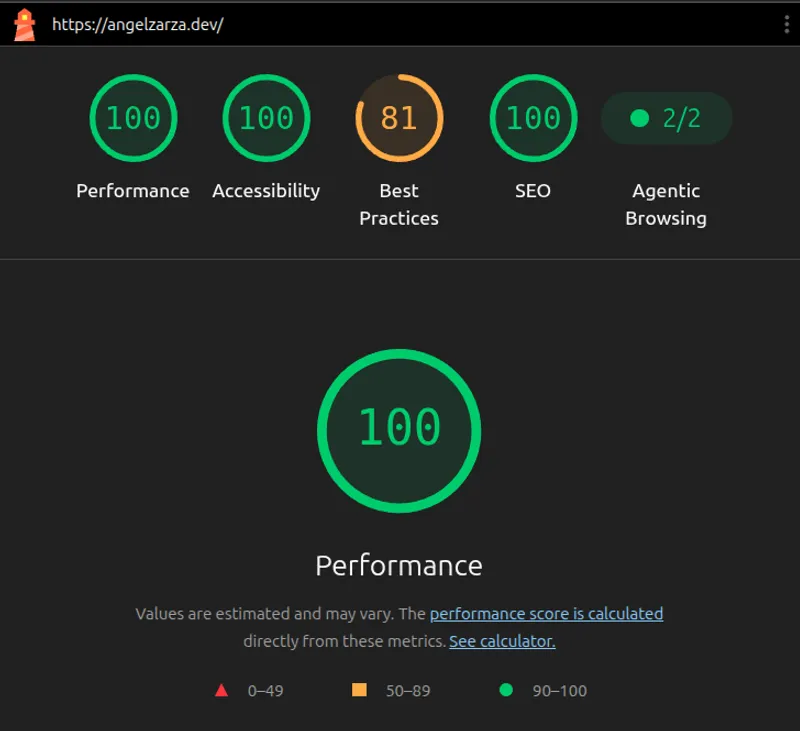
Overall, performance is excellent: 100 in Performance, Accessibility,
and SEO. The Best Practices score stays at 81 because of a
third-party script injected by Cloudflare JavaScript Detections,
specifically cdn-cgi/challenge-platform/scripts/jsd/main.js. In this
run, Lighthouse detects that the script uses browser APIs marked as
obsolete or in the process of being deprecated. This behavior is
generated by Cloudflare’s layer and is not something I directly control
from the blog’s code.
I also included the Core Web Vitals metrics and rendering times from this lab test:
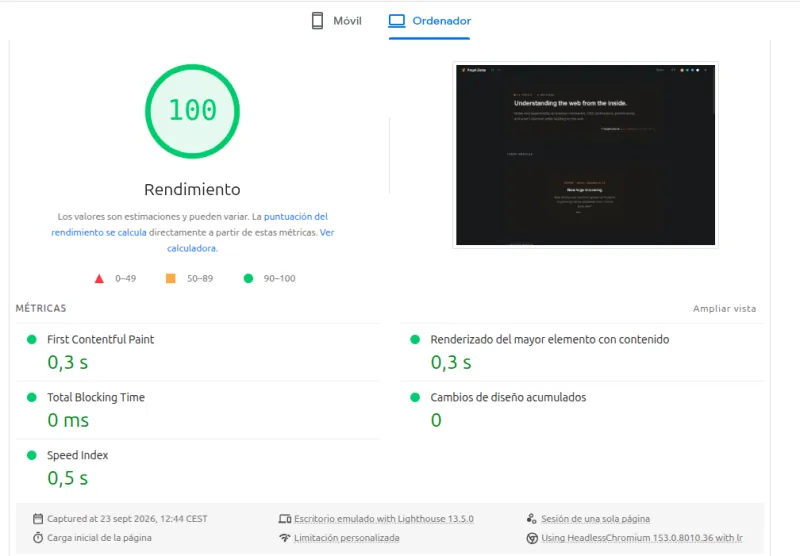
As shown in the report, Total Blocking Time (TBT) is 0 ms, Speed Index is 0.5 s, LCP remains at 0.3 s, and Cumulative Layout Shift (CLS) is 0.
I do not include an INP value because this Lighthouse measurement is a lab test, rather than a real user interaction metric. To analyze INP in a representative way, field data would be needed.
2. It’s Not All Sunshine and Roses
For this project, I chose a hybrid architecture: pages that can be prerendered are generated statically, while the dynamic parts run on demand at Cloudflare’s Edge. This lets me keep the blog’s content static when it does not need runtime processing, while still having a backend when a feature requires it.
These are some of the key packages from package.json:
{
  "dependencies": {
    "@astrojs/cloudflare": "14.3.2",
    "@libsql/client": "0.18.0",
    "@sentry/astro": "10.75.0",
    "astro": "7.3.3",
    "drizzle-orm": "0.45.2"
  }
}
These are the versions at the time of writing, and the information may change in future releases.
I use Sentry exclusively to capture unhandled exceptions and monitor the site’s performance, while respecting user privacy. You can read the privacy policy for more details.
Turso/LibSQL and Drizzle ORM are used to track the likes count for
each article. This entire flow is handled through an Astro Action
(actions.likes.toggle) running in Cloudflare’s runtime, so database
communication happens on the server and neither Drizzle nor the LibSQL
client is sent to the browser. More specifically, I import
createClient from @libsql/client/web, the package entry point suited
to the web runtime of Cloudflare Workers.
The main problems I found during development were in two areas: Biome and Cloudflare/Vite.
For anyone who does not know it, Biome is a very
fast linter and formatter written in Rust. In the 2.5 version I use,
support for .astro files depends on experimentalFullSupportEnabled
and had improved quite a lot, but I was still finding some false
positives related to the frontmatter code in my project.
To avoid constantly fighting the linter, I applied a temporary
configuration adjustment in biome.json, disabling noUnusedImports
and noUnusedVariables only for .astro components:
{
  "html": {
    "experimentalFullSupportEnabled": true
  },
  "overrides": [
    {
      "includes": ["**/*.astro"],
      "linter": {
        "rules": {
          "correctness": {
            "noUnusedImports": "off",
            "noUnusedVariables": "off"
          }
        }
      }
    }
  ]
}
This adjustment has a clear trade-off: Biome stops detecting unused
imports and variables inside .astro files. For now, I prefer taking on
that limitation rather than having false positives all the time, but it
is something I will need to revisit as Astro support in Biome improves.
I keep Prettier as a secondary formatter for Markdown, MDX, and YAML content; the pre-commit hook applies it to those formats, while Biome handles the project’s code.
Finally, a problem came up with the integration between Astro, Vite, and the Cloudflare adapter. In development mode, Vite can discover new dependencies while running and optimize them again. In my case, this combination caused HMR issues when working with some dependencies that have CJS and ESM interoperability.
To prevent Vite from discovering and optimizing dependencies dynamically
again, I added noDiscovery: true and explicitly declared the
dependencies I want to pre-bundle:
vite: {
  optimizeDeps: {
    noDiscovery: true,
    include: [
      "@libsql/client/web",
      "drizzle-orm",
      "drizzle-orm/libsql",
      "drizzle-orm/sqlite-core",
      "@sentry/astro",
      "baseline-status",
    ],
  },
  ssr: {
    optimizeDeps: {
      noDiscovery: true,
    },
  },
},
This stops Vite from trying to discover new dependencies during
development and limits it to optimizing the ones I explicitly listed. In
my case, this fixed the HMR problem I was having locally. The trade-off
is that if I add a dependency that needs to be pre-bundled, I need to
add it to the include array.
3. Fun Stuff
I would like to cover more Astro topics in the future, but for now I will talk about two web optimization features I find interesting: Speculation Rules and Prefetch, both of which are gaining better browser support.
<link rel="prefetch"> downloads a resource ahead of time to keep it in
the cache, while speculation rules can also go as far as prerendering a
page. That is why the latter can save more work in a future navigation,
but also consumes more resources.
I also put together a small CodePen in case you are interested in learning more about the difference between the two technologies:
About the demo: this example shows the idea behind
<link rel="prefetch">and the Speculation Rules API. The CodePen embedded environment does not allow these features to run as a top-level page, but you can open the Pen to review and experiment with the code in your local environment.
4. Conclusions
At the end of the day, I feel this stack is a very powerful combination: simple integration, very low infrastructure costs, and enviable performance. If I had to start a new personal project from scratch, I would choose this ecosystem again without hesitation.
5. What’s Next
Thanks for making it this far. I hope this was an interesting first introduction to the blog. My intention is to keep writing regularly and share content about web development and engineering.
You can visit my GitHub and LinkedIn to keep up with future articles or projects. You can also subscribe to the newsletter at the bottom of the page so you do not miss any updates.
Thank you very much, and see you soon!